hybridMT is a software package for seismic moment tensor inversion and refinement. It calculates full, deviatoric and double-couple constrained moment tensors from first P-wave amplitudes, estimates their uncertainties, and refines the moment tensors of clustered events with the Hybrid Moment Tensor technique. It is used for local and regional seismic networks, induced seismicity and acoustic emission data from laboratory experiments. From version 2.0.0, hybridMT can be used from MATLAB, from Python and from the command line.
What is new in version 2.0.0
- Python interface: the Python package hybridmt provides focimt() and hybridmt() with the same options, the same result fields and the same numbers as the MATLAB functions.
- fociMT 4.4.1: corrected shading of the T and P axes in the beach balls, and corrected colour options.
- More robust MATLAB functions: clear error messages for invalid input data (for example repeated event IDs or stations), and new options to control the input data statistics of hybridMT.
- New documentation: an updated MATLAB help in which each MATLAB example is followed by its Python equivalent, and a new PDF manual.
- Demo scripts for MATLAB and Python that show the main features on the sample data in one run.
Main features
- Moment tensor inversion in the time domain: unconstrained full, deviatoric (trace-null) and double-couple constrained moment tensors, L1 or L2 norm, decomposition into ISO, CLVD and DC components (Jost and Herrmann, or Vavryčuk).
- Two input formats: amplitudes with takeoff angles and distances, or station and event coordinates with a 1D velocity model and the built-in ray tracer.
- Uncertainty assessment: station Jacknife test and resampling of the input data (polarities, stations, amplitudes and takeoff angles).
- Hybrid Moment Tensor refinement of event clusters: detects and corrects stations with a persistent amplitude bias (site effects, wrong gains) and reports the polarity statistics of every station.
- Graphics: beach balls in PNG, SVG, PDF and PS format, Hudson source type plots and stereonets.
- Output as MATLAB structures, Python objects or ASCII files.
The command line tool focimt (Windows binary included, sources for Linux and macOS) does the inversion; it is described shortly on a separate page. The MATLAB functions focimt.m and hybridmt.m and the Python package hybridmt use it and return the results directly in MATLAB or Python. The package was thoroughly tested with synthetic data, acoustic emission data from laboratory experiments as well as induced seismicity data from geothermal sites.
Examples
1. Moment tensor inversion with the Jacknife test. The same inversion in MATLAB, in Python and on the command line, using a sample file of the package. Each call returns the full, deviatoric and double-couple solutions and writes their beach balls in PNG format.
MATLAB:
Solution = focimt('examples/example2_raw.txt', 'Jacknife', 'on', 'BeachBallFormat', 'PNG');
Solution{1}.full.F1      % strike, dip, rake of the original and the Jacknife solutions
Python:
from hybridmt import focimt
result = focimt('examples/example2_raw.txt', jacknife=True, beach_ball_format='PNG')
result.solution[0].full.F1
Command line:
focimt -i examples/example2_raw.txt -s FTD -j -t PNG -o result
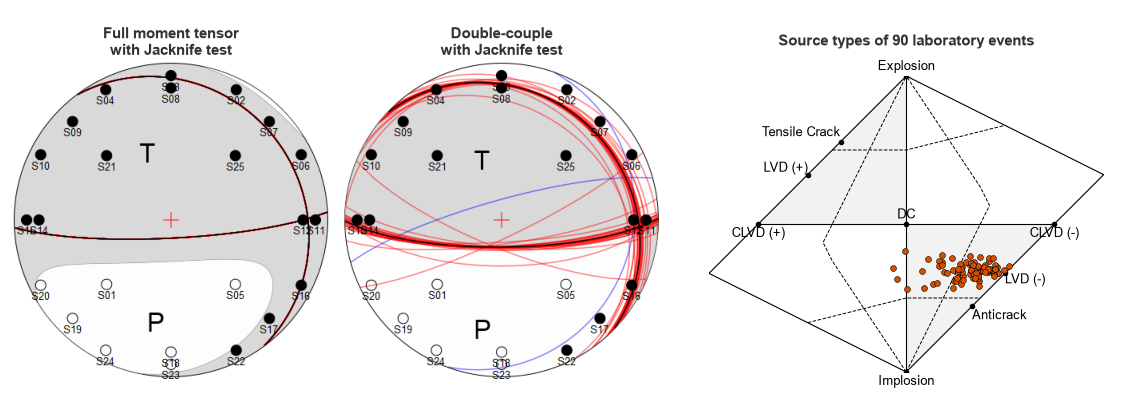
2. A catalog of events. The moment tensors of 90 acoustic emission events from a laboratory experiment are calculated at once and shown in a Hudson source type plot.
MATLAB:
Solution = focimt('examples/example3.txt');
drawhudsonnet(getsolution(Solution, 'full', 'MXX'));
Python:
from hybridmt import focimt, get_solution
from hybridmt.plots import plot_hudson
Solution = focimt('examples/example3.txt').solution
plot_hudson(None, get_solution(Solution, 'full', 'MXX'))
Beach balls of the full and double-couple moment tensor with the Jacknife test, and a Hudson source type plot of 90 laboratory events:
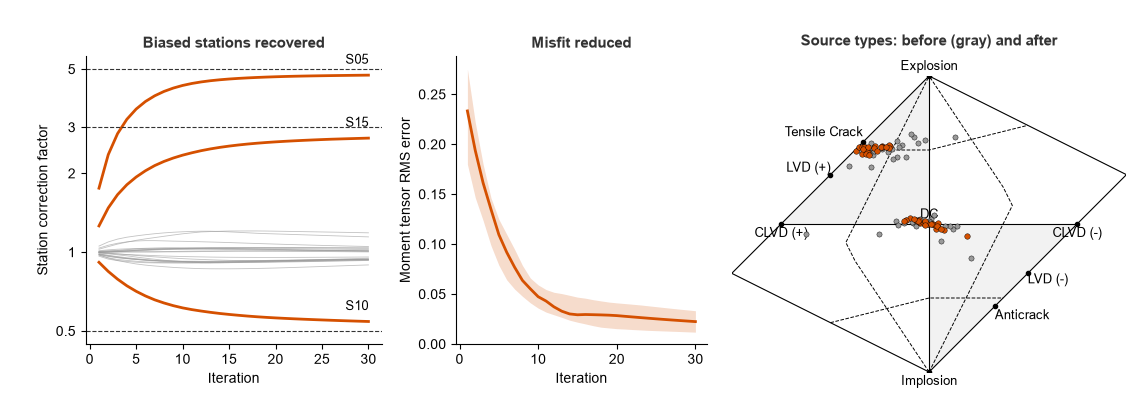
3. Hybrid Moment Tensor refinement. The synthetic data set of the package contains 50 events in which the amplitudes of three stations were biased by factors of 0.2, 2 and 1/3. The refinement recovers the corresponding correction factors (4.74, 0.54 and 2.72 compared with 5, 0.5 and 3) and reduces the median RMS error of the moment tensors from 0.23 to 0.02.
MATLAB:
[Solution, History] = hybridmt('examples/example5.txt', 'Iterations', 30, 'Weight', 0.25);
History.U        % correction factor of each station
Python:
from hybridmt import hybridmt
solution, history = hybridmt('examples/example5.txt', iterations=30, weight=0.25)
history.U        # correction factor of each station (history.Stations)
Correction factors of the biased stations, the RMS error during the refinement and the source types before and after the refinement:
More examples are given in the documentation and in the demo scripts examples/demo_focimt_hybridmt.m and examples/demo_focimt_hybridmt.py of the package.
Background
The seismic moment tensor is becoming a standard for description of earthquake kinematic source processes in the whole range of magnitudes. Seismic moment tensor inversion allows to estimate the fault plane parameters and the balance between volumetric and non-volumetric strain in the seismic source. The resolved seismic moment tensors are typically decomposed into volumetric and deviatoric components, which allows to understand the physical processes in the sources regardless of the type and size of the seismicity. The Hybrid Moment Tensor technique (Andersen, 2001) uses the events of a cluster to estimate and remove the station, site and path effects that bias the amplitudes, which improves the quality of the moment tensors.
Authors/License
Grzegorz Kwiatek and Patricia Martínez-Garzón
hybridMT package is licensed under GNU General Public License (GPL).
Referencing
When you find hybridMT package useful, please refer to it in your work:
Kwiatek, G., Martínez-Garzón, P., and M. Bohnhoff (2016). HybridMT: A MATLAB/Shell Environment Package for Seismic Moment Tensor Inversion and Refinement. Seismol. Res. Lett. 87 (4), DOI: 10.1785/0220150251.
Download hybridMT software package
Current version of hybridMT package is 2.0.0 that was published on October 6th, 2026. The package contains the MATLAB toolbox, the Python package, the focimt binary for Windows with its source code for Linux and macOS, sample data and documentation. Python 3.10 or newer with numpy and matplotlib is required for the Python package; the MATLAB functions were tested with MATLAB R2021a.
The hybridMT package may be requested by filling the online form below. After submitting the form, the email will be sent to You with a download link (please check your spam folder if the email will not appear in your mail box after a couple of minutes).
Documentation
The hybridMT package contains documentation that directly integrates with MATLAB help system (as MATLAB documentation is composed of HTML documents, it can be also open in any web browser). Every MATLAB example in the documentation is followed by its Python equivalent, and separate chapters describe the installation of the Python package and the correspondence between the MATLAB and Python results. The same documentation is provided as a PDF manual in the package. Also, you can download the PDF manual separately from here:
Documentation of hybridMT moment tensor inversion and refinement package (version 2.0.0)
Finally, there is a FAQ section just below.
FAQ
-
What is the magnitude limit for application of fociMT or hybridMT algorithms?
The fociMT algorithm is point-source moment tensor inversion and the fault rupture processes (e.g. directivity or spatial changes in elementary moment tensors) are NOT considered. As such, the algorithm is valid for events with simple source time functions that can be represented by a single pulse. Therefore, it is suggested to use the algorithm for events with moment magnitudes not exceeding Mw 4.
-
Should focal mechanisms (or moment tensors) I intend to refine altogether with hybridMT technique be similar?
No. There is no requirement that input data come from earthquakes displaying similar focal mechanism. The hybridMT refinement method is NOT based on empirical Green’s function technique, where this requirement is imposed. Actually, the larger the variability of focal mechanism, the better refinement of seismic moment tensors is generally expected.
-
Is your method for refining seismic moment tensor based on empirical Green’s function technique?
Shortly speaking, no. The moment tensor refinement method used in hybridMT algorithm is NOT using the concept of empirical Green’s function technique, although the refinement of seismic moment tensors is also achieved by suppressing the propagation effects (similarly to EGF method). As such, none of EGF assumptions (i.e. similarity of focal mechanisms forming the cluster) is not relevant for hybridMT refinement.
-
What is the “omega” parameter in the focimt input file and how to calculate it?
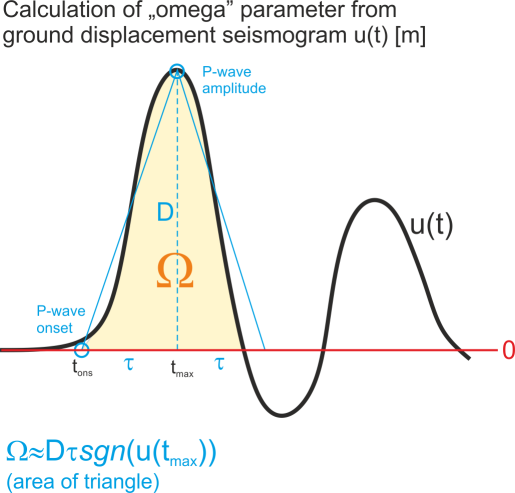 “omega” parameter which is a part of ASCII input file is basically the area below the first P-wave ground displacement pulse (in time domain) or equivalently the spectral level taken from the amplitude spectrum of ground displacement pulse. The unit of “omega” parameter is [m * s] (meter times second), and it comes from the fact that we multiply the amplitude of first P-wave pulse using ground displacement seismogram in [m] by the half of duration of the first P-wave pulse in [s]. Regardless of whether time or frequency domain was used to extract the “omega” value, the parameter should contain the sign information. The sign of “omega” is in accordance with the seismological convention, i.e. it is positive for the positive first P-wave ground displacement amplitude (i.e. ground motion AWAY from the seismic source) and negative otherwise (ground motion TOWARDS the seismic source).
In case of simple impulsive source time functions it is typically not necessary to calculate the integral of ground displacement first P-wave pulse. Instead, the amplitude D (cf. picture) including sign information of first P-wave pulse may be taken from ground displacement seismogram (the seismogram should be calibrated to [m]) and multiplied by the the rise time (i.e. time interval between the P-wave onset and P-wave amplitude, t_max-t_ons in seconds [s]). In this case, the integral of the pulse is simply replaced by the area of the triangle.
-
What full moment tensor decomposition scheme is used in focimt.m?
The MATLAB wrapper focimt.m has no option for changing the decomposition scheme, which is currently fixed to Jost and Herrmann’s (1989) approach. However, the focimt application has implemented an alternative decomposition scheme based on Vavrycuk’s (2001) approach. In focimt application this is specified by option -d D or -d Y (see the documentation of focimt application for details). Therefore, the hardcoded decomposition scheme in focimt.m may be changed from Jost and Herrmann’s to Vavrycuk’s approach simply by changing the following line from (note change from “D” to “Y” in option -d):
commandline = ['-i ' temp '.txt -d DWAFTUMVE -o ' temp ' -s ' solutions ' -n ' normfunc ' ' bbsize ' ' bbformat ' ' bbproj ' ' jacknife ' ' bootstrap ' ' vmodel ' ' ball];
to
commandline = ['-i ' temp '.txt -d YWAFTUMVE -o ' temp ' -s ' solutions ' -n ' normfunc ' ' bbsize ' ' bbformat ' ' bbproj ' ' jacknife ' ' bootstrap ' ' vmodel ' ' ball];
Future version of focimt.m implement the decomposition switch parameter.
-
How should I provide takeoff angle in RAW ASCII file format?
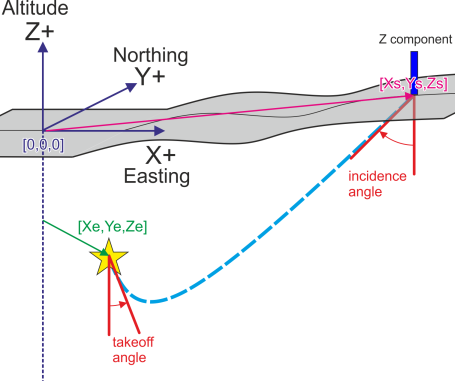 The takeoff angle is measured in degrees from dowgoing ray (towards the center of Earth) direction. The seismic ray leaving the source purely up (towards the Earth surface) has takeoff angle of 180 degrees. The ray leaving earthquake source towards center of Earth has a takeoff angle of 0 degrees.
-
What is the azimuth convention for RAW ASCII file format?
The azimuth of a vector from the seismic hypocenter to the seismic station is measured in degrees, and it is positive from north towards east. 0,90,180, and 270 degrees corresponds to the station located North, East, South, and West from the earthquake hypocenter.
-
What is the incidence angle convention for RAW ASCII input file?
- The angle of incidence in RAW ASCII input file follows the standard seismological convention. The angle of incidence to the sensor is measured in degrees from down direction (towards center of Earth). In other words, the seismic ray pointing directly up (perpendicular towards the surface) has 0 degrees incidence angle and pure horizontal ray (parallel to the surface) has 90 degrees incidence angle.
Note #1: In case of pure horizontal ray (incidence = 90) one should not expect P-wave arrival to be visible on vertical component. Phases with incidence angle = 90 degrees should be disregarded from processing.
Note #2: Large values of incidence angle (>80 degrees) leads to high corrections for “omega” parameter, as the “omega” is divided by the cosine of the angle of incidence. This typically leads to overestimation of total and scalar seismic moment, as well as it may influence the moment tensor decomposition.
-
Why I get error message on “incorrect expression or statement” when running drawhudsonnet.m or drawstereonet.m?
If you get error similar to this:
>> drawhudsonnet;
??? Error: File: drawhudsonnet.m Line: 119 Column: 3
Expression or statement is incorrect--possibly unbalanced (, {, or [.
it is likely due to the fact that your version of MATLAB does not support empty output arguments that are specified in MATLAB as “~” (tilde character). If possible, please update your MATLAB to the newest version that handles empty output arguments. Alternatively, please change every null output variable “~” to any valid and not used variable name, e.g. “dummy”:
[~,DD] = eig(M);
to
[dummy,DD] = eig(M);
This problem will be resolved in future version of hybridMT.
-
Why I receive error messages “Argument ‘###’ failed validation with error: ####”
Consider a scenario of executing the drawstereonet.m function:
[X,Y] = drawstereonet([10 20 30 40],[50 60 70 80]);
??? Error using ==> drawstereonet at 43
Argument 'AZM' failed validation with error:
Undefined function or method 'ismatrix' for input arguments of type 'double'.
This error results from the fact your MATLAB version does not contain ismatrix() routine. If it is possible, please update the MATLAB to the newest version. Alternatively, you can try to disable the validation routine. In case of example above, by changing line:
p.addOptional('AZM', [], @(x) ismatrix(x) && isnumeric(x) );to:
p.addOptional('AZM', [], @(x) isnumeric(x) );